📞 Phone Field
How to add Phone Field to your Form?
To add a phone field to your form using FormNX's drag-and-drop form builder, follow these simple steps:
Step-1: Just click on the Phone element to add the element to your form.
Step-2: After adding the "Phone" field element to your form, you can customize phone field settings according to your specific requirements.
- By default, the phone field for all countries is enabled. However, you can customize this setting according to your specific requirements.
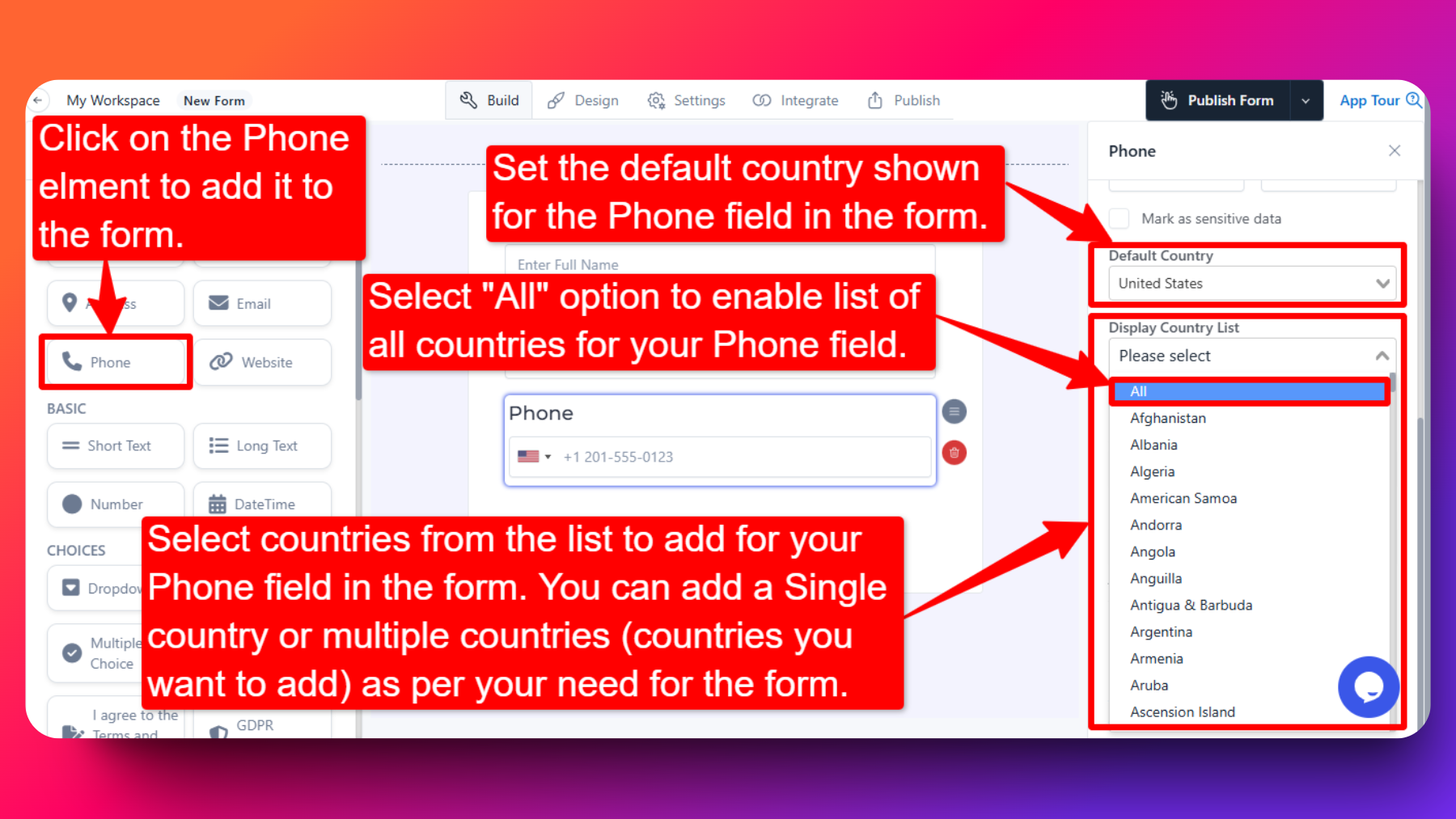
Step-3: Customization Options:
Single Country Selection:
If you add only one country from the list, then users will have to enter a valid phone number for that specific country only.
Multiple Country Selection:
Adding multiple countries from the list allows users to select their country from a dropdown menu in the phone field. Users can then input a valid phone number for the selected country.
All Countries Option:
Selecting the "all" option from the list grants users the freedom to choose their desired country from a comprehensive list of options. Users can then input a valid phone number for the chosen country.
If you do not specify/add any country for the phone field, then the default phone field for all countries will be applied.
How Phone Number Validation Works
The Phone field validates entries automatically based on the selected country — you don't need to add any extra validation rules.
- The respondent's selected country (or the country you locked the field to) determines the expected number format and digit count.
- FormNX checks the entered phone number against that country's format internally and rejects invalid numbers at the field level, before the form can be submitted.
- This validation is format-based, not OTP-based — no SMS or call is sent to the number, and the respondent doesn't need to receive a code. Validation happens instantly as the number is typed.
If you specifically need to verify that the respondent owns the phone number (not just that the format is valid), you'd need an OTP/SMS verification step — FormNX currently provides OTP verification only on the Email field. See Email Verification (OTP).