
If you run a clinic, manage a private practice, or just want patients to book through your website instead of phone tag, you need a doctor appointment form — one that captures the right details upfront, works on any device, and protects patient information.
Most clinics now use an online doctor appointment form that patients can fill in from their phone. This form also generates a printable PDF version containing the appointment details. This guide gives an online doctor appointment form along with a free template that you can copy and start using today, with the conditional logic and consent capture most off-the-shelf templates skip.
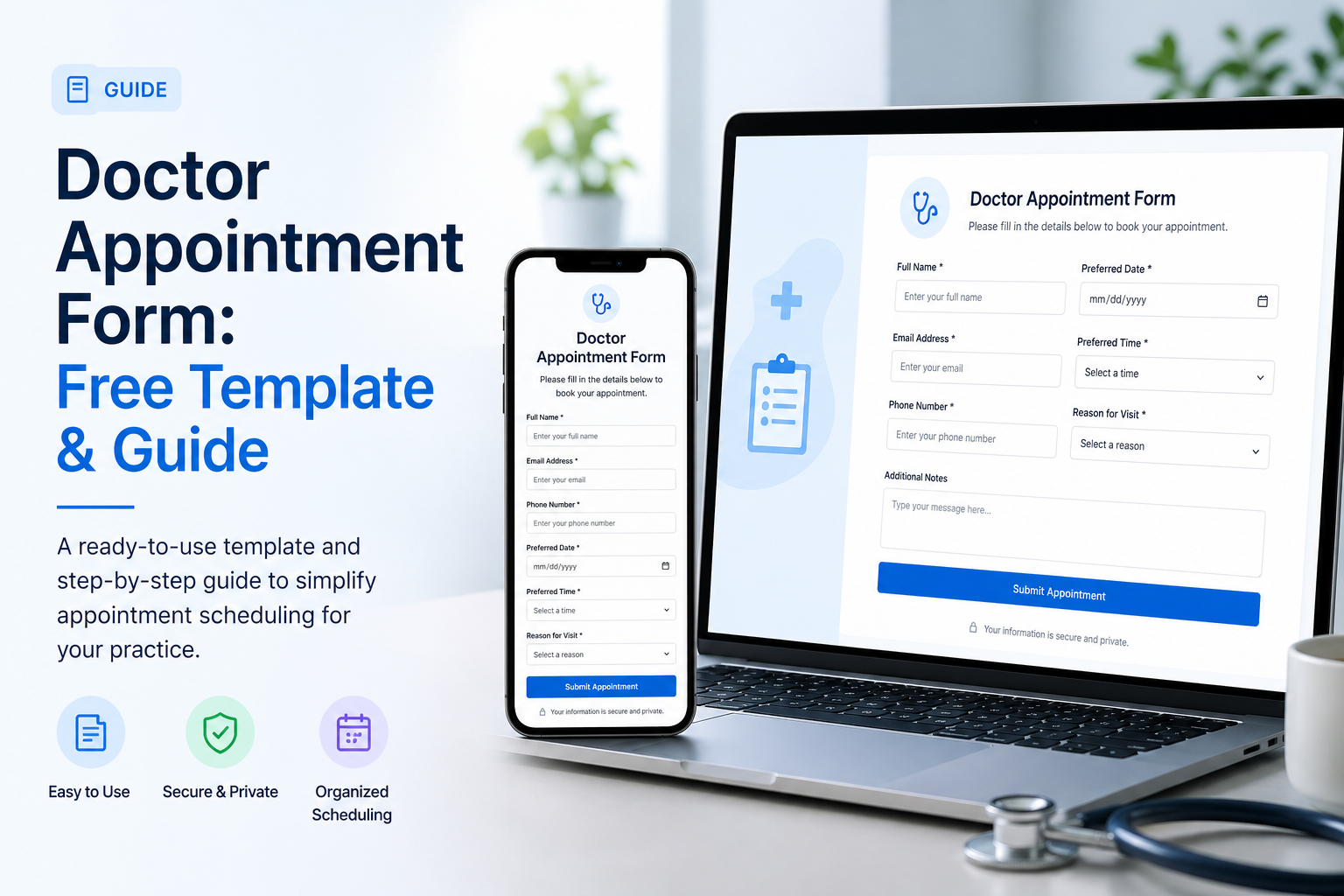
Free Doctor Appointment Form Template
Skip the blank canvas. Start with this ready-to-use doctor appointment form template — already wired with the standard fields most clinics need, mobile-friendly, and embeddable on any website.
➡️ Open the Doctor Appointment Form template
What's included out of the box:
- Patient name, contact, and date of birth
- Preferred appointment date and time
- Reason for visit (with conditional follow-up questions)
- Existing medical conditions and current medications
- Insurance details and document upload
- Digital consent signature
You can use this doctors appointment form as-is, customize fields to match your specialty (dental, pediatric, behavioral health, etc.), or download submissions as a PDF for your records and patient charts.
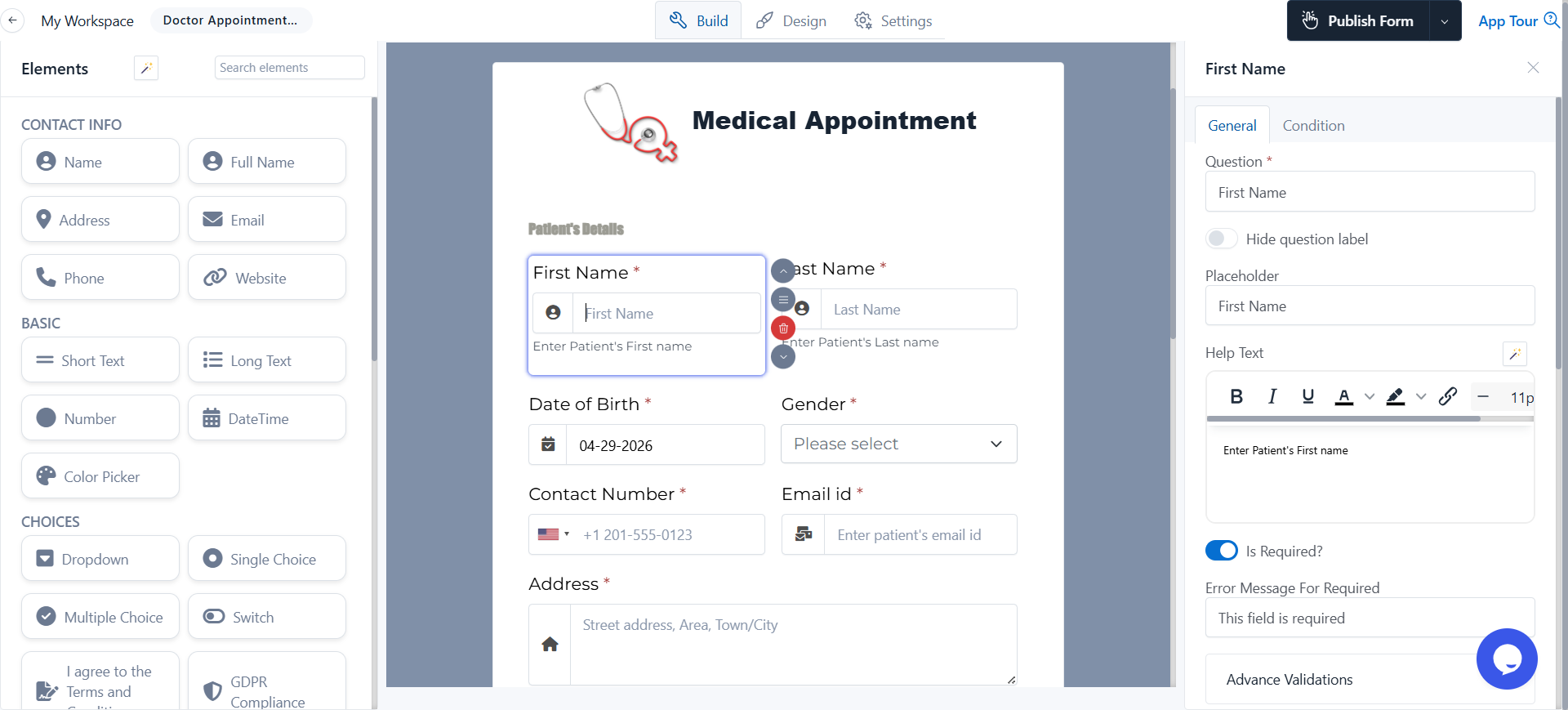
Need a printable version? Skip down to Doctor Appointment Form PDF — covered later in this guide with an auto-generated PDF.
What Is a Doctor Appointment Form?
A doctor appointment form is the document a patient fills in to request a visit with a healthcare provider. It collects the booking details (who, when, why) plus the medical context the doctor needs to prepare for the appointment.
In a paper-first clinic, this is usually a printable intake sheet at the front desk. In a digital practice, it's an online doctor appointment form on the clinic's website that feeds straight into the EHR or scheduling tool. Many clinics now run both in parallel — paper for walk-ins, digital for everyone else.
A well-designed appointment form does three things:
- Reduces no-shows by capturing contact info for SMS and email reminders.
- Saves clinical time by collecting medical history before the visit, not during it.
- Stays compliant by handling consent, signatures, and patient data correctly.
When you scale that across hundreds of monthly appointments, the difference between a good form and a generic one shows up directly in front-desk hours and missed bookings.
Fields Every Doctor Appointment Form Should Include
Most clinics over-engineer their first appointment form, asking for 30+ fields and watching patients abandon halfway through. Start with the essentials below, then add specialty-specific questions only when you actually need them.
1. Patient Information
- Full legal name
- Date of birth
- Phone number (use a phone-validated field, not plain text)
- Email address
- Mailing address (for billing and post-visit summaries)
2. Appointment Details
- Preferred date (date picker)
- Preferred time slot (dropdown — morning, afternoon, evening)
- Type of visit (in-person, telehealth, follow-up)
- Whether this is a new or returning patient
3. Reason for Visit
A short text area paired with a checklist of common conditions (cold/flu, chronic pain, annual checkup, etc.). The checklist helps front-desk staff route the request faster, and gives you the input for conditional triage logic later.
4. Medical Context
- Allergies (medications, food, environmental)
- Current medications and dosages
- Existing conditions
- Recent surgeries or hospitalizations
5. Insurance & Documents
- Insurance provider name
- Member ID
- File upload for insurance card (front + back)
- File upload for ID
6. Consent
- HIPAA acknowledgment checkbox
- Digital signature for treatment consent
- Optional: consent for telehealth or sharing records with primary physician
If you also handle full patient onboarding (not just appointment booking), see our patient registration form guide — it expands these fields into a complete intake workflow with insurance verification and HIPAA-compliant consent.
How to Create an Online Doctor Appointment Form (5 Steps)
Here is the exact process to build one in under 15 minutes using FormNX. Every step works just as well in any modern form builder, but the medical appointment form category in FormNX is specifically tuned for clinical intake.
Step 1: Start From the Template
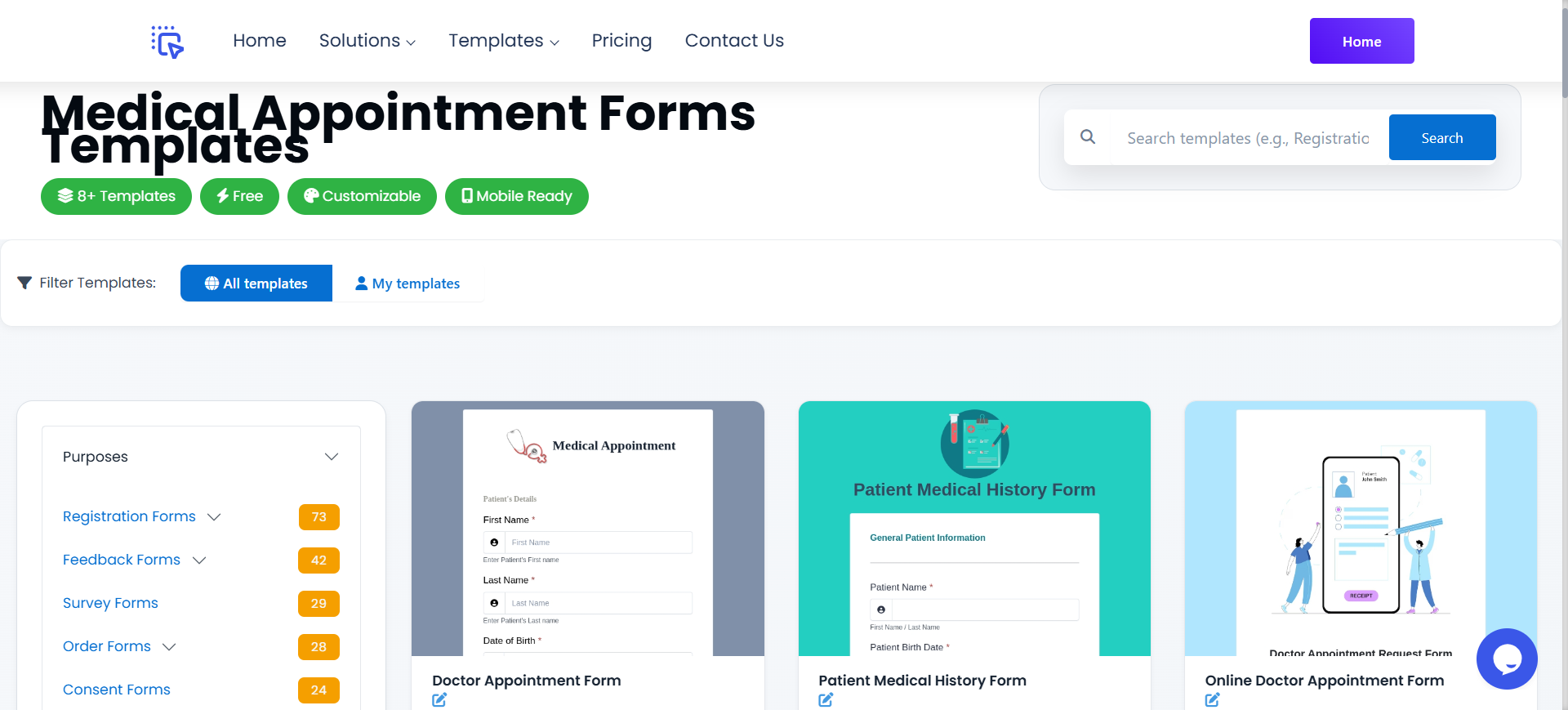
Open the medical appointment forms category in FormNX's appointment scheduling forms gallery and pick the doctor appointment template. Click Use this template. The form opens in the builder with all standard fields already in place.
Step 2: Customize Fields for Your Specialty
Pediatric clinic? Add parent/guardian information. Dental practice? Swap "current medications" for "last cleaning date." Behavioral health? Add intake-specific screeners (PHQ-9, GAD-7). Drag, drop, rename — no code.
Step 3: Add Conditional Logic for Symptom Triage
This is what separates a basic intake form from a real clinical workflow. Use conditional fields to show or hide questions based on the patient's reason for visit.
Example: if a patient selects "chest pain" as the reason for visit, the form can immediately surface a high-urgency notice ("If this is an emergency, call 911") and additional triage questions — duration, radiation, associated symptoms. If they select "annual checkup," the form skips those entirely and goes straight to scheduling.
Step 4: Capture Consent and Signature
Drop in a signature field for HIPAA acknowledgment and treatment consent. The signature is timestamped, captures the visitor IP for the audit trail, and embeds in the saved PDF — three things a paper signature physically cannot do.
Step 5: Set Up Auto-Confirmation
Turn on automatic email confirmation so the patient gets a copy of their appointment request immediately, with the date, time, and what to bring. This single feature reduces "did you get my form?" calls by a noticeable margin in most clinics.
(Full walkthrough: setting up confirmation emails.)
Publish the form, embed it on your clinic website, and you're live.
Doctor Appointment Form PDF: When You Need a Printable Version
Sometimes you need a PDF version of your appointment details. Every appointment form should have a downloadable PDF option.
Auto-generate a PDF from each submission: When a patient fills out your online form, FormNX generates a branded doctor appointment form PDF automatically and emails it to both the patient and your office. This is the cleanest workflow because you keep the digital benefits (validation, conditional logic, EHR sync) and still get a paper-ready record for the chart.
For a deeper dive on automated PDF documents from form submissions — including dynamic fields, branding, and email delivery — see how to create a PDF from form responses.
Smart Features Modern Doctor Appointment Forms Should Have
Most template galleries stop at "name, date, reason for visit." These features are what separate a 2026 doctor appointment form from a 2010 one.
| Feature | What it does | Why it matters |
|---|---|---|
| Conditional logic | Shows/hides questions based on the answer | Skips irrelevant fields, cuts form length |
| File upload | Patient uploads insurance card, ID, prior records | Saves a phone call before every appointment |
| Auto-confirmation email | Sends instant booking summary | Reduces "did you get my form?" inquiries |
| Digital signature | Captures HIPAA consent legally | Replaces wet signatures with timestamped audit trail |
| Submission scheduling | Auto-closes the form after hours | Stops requests when nobody can respond to them |
| PDF auto-generation | Creates a branded record per submission | Drop straight into the patient's chart |
| Mobile-first design | Works on phones at the same quality as desktop | The majority of patients fill medical forms on a phone |
FormNX includes all of these out of the box — no add-ons. Used by 7,000+ customers including healthcare practices that need HIPAA-aware design without bolt-on services.
Use Cases by Practice Type
The same base template can be adapted for almost any healthcare context. A few real-world examples of how clinics tweak the standard fields:
- General practice: keep the template close to the default. Add a "preferred provider" dropdown if you have multiple doctors.
- Dental: replace medications/conditions with last cleaning date, dental insurance details, and cleaning vs. emergency vs. cosmetic visit type.
- Pediatric: add parent/guardian contact, child's date of birth (with age auto-calculation), school district, and pediatrician referral source. If your practice also handles seasonal youth program intake, the same fields carry over to a summer camp registration form — with age-bracket placement tied to the camp's start date.
- Behavioral health: add screening questionnaires (PHQ-9, GAD-7), confidentiality acknowledgment, and emergency contact details.
- Telehealth: add a video-platform readiness check (camera, microphone, internet), state of residence (for licensure compliance), and timezone.
- Specialist referral: add referring physician details, prior diagnostic test results upload, and primary insurance authorization status.
In every case, start from the same base doctor appointment form template and adapt — don't build from scratch.
Common Mistakes to Avoid
After reviewing hundreds of clinic intake forms, these are the four mistakes that cost you patients fastest.
- Asking for a Social Security Number upfront. You almost never need it before the appointment is confirmed. Move it to the in-clinic check-in step.
- No mobile preview. If the form looks bad on a phone, you lose a sizable share of submissions before patients even start typing.
- Plain-text "phone number" field. Use a phone-validated field. Otherwise you collect "555-call-me" and unreachable typos that cost you the appointment.
- Missing consent capture. A doctor appointment form without a HIPAA acknowledgment and signature creates real compliance risk — especially in the US. Always include both.
Frequently Asked Questions
How do I make an appointment form?
The fastest way is to start from a template. Pick a doctor appointment form template, customize the fields to match your practice, add conditional logic and a consent signature, then embed the form on your website. The whole process takes under 15 minutes from start to publish.
What documents do I need to make a doctor's appointment?
Most clinics ask for: a photo ID, your health insurance card, a list of current medications and allergies, vaccination records (especially for new patients), and any relevant prior medical records or referrals. A well-designed online appointment form lets patients upload these in advance instead of bringing physical copies.
What is a form of appointment?
"Form of appointment" typically refers to a written agreement appointing a professional (legal, consulting, medical) to provide a service. In a clinical setting, it's the intake form a patient fills out to request and confirm a visit with a healthcare provider.
Can I download a doctor appointment form as a PDF?
Yes. With FormNX, every submission auto-generates a branded PDF you can email, print, or attach to a patient's chart. You can also print a blank version of the form to keep paper copies at the front desk for walk-ins or patients who prefer paper.
Is an online doctor appointment form HIPAA compliant?
The form itself can be HIPAA-aware (encrypted submissions, audit logs, signature capture, role-based access controls), but full HIPAA compliance also depends on how you store and share submissions, who has access to the dashboard, and whether you have a Business Associate Agreement with your form provider. Always verify with your form provider before collecting protected health information.
What is the short form for a doctor appointment?
"Dr appt" is the most common abbreviation in calendars and notes. In medical records you will also see "F/U" (follow-up) and "NP" (new patient) used alongside it. None of these are formal — they are scheduling shorthand, not clinical codes.
Ready to Build Your Doctor Appointment Form?
Browse appointment scheduling form templates — or start with the medical appointment forms category for healthcare-specific layouts. Every template is free, customizable, and ready to embed on your clinic website. With over 13,000 forms already created on FormNX and 5+ lakh submissions handled, the underlying platform has been hardened for the volume real clinics actually need.