
Struggling with manual PDF creation from form submissions wastes 10-15 minutes per document and frustrates teams handling high volumes. In 2026, the form automation market hits $26B, driven by demand for instant, branded PDFs that boost completion rates from the average 51.7%.
Introduction
Online forms generate leads, registrations, and orders-but raw data in spreadsheets or basic emails fails to deliver professional results. Users abandon 52.5% of mobile forms without instant, shareable confirmations like PDFs. Businesses need a way to how to create a PDF document automatically from submissions, turning responses into invoices, contracts, or certificates in seconds.
That's where FormNX steps in. This no-code platform lets you how to create PDF from form responses with a drag-and-drop editor, over 1000 templates, and dynamic fields that pull data like {name} or {email} directly into branded layouts. No designers, no coding-just build your form, design the PDF once, and automate generation on every submission.
This guide covers all your needs:
- Generate PDF documents from online forms for e-commerce quotes or event registrations.
- Create custom PDF from form submission with logos, colors, and reference numbers.
- Step-by-step FormNX tutorial with screenshots.
- Comparisons to Google Forms/Jotform limitations.
- Ready-to-use templates you can duplicate instantly.
By the end, you'll automate PDFs that cut support queries by 40-50% and lift conversions like Paperform's 24% onboarding gain. Whether you're replacing Google Forms' clunky exports or scaling agency workflows, FormNX handles it free.
Ready? Follow these steps to transform form data into professional PDFs-no technical skills required.
Why PDFs for Form Responses?
Raw form data in Google Sheets or email notifications works for small teams, but it kills professionalism and trust. PDFs solve this by delivering instant, branded, tamper-proof documents that users expect in 2026.
Businesses using automated PDF generation from online forms see clear wins across key metrics. Here's why attaching PDFs to submissions beats spreadsheets every time:
- Builds Instant Trust: 61% higher completion rates in government and charity forms when users receive branded PDF confirmations-vs. generic "thanks for submitting" pages.
- Ensures Compliance: Fixed formats prevent accidental edits, critical for invoices, contracts, or HIPAA-bound healthcare data (44.4% form completion baseline improves with secure exports).
- Cuts Support Load: Auto-email PDF receipts reduce "did you get my form?" queries by 40-50%, freeing teams from manual exports that take 10-15 minutes per document.
- Boosts Conversions: Paperform added PDF confirmations to onboarding, lifting rates from 71% to 88% (+24%)-ecommerce hits 50.9% completion with quote PDFs. For employee onboarding specifically (offer letters, signed I-9, handbook acknowledgments), see our HR forms toolkit for the full personnel-file workflow.
- Mobile-Friendly Sharing: 47.5% mobile abandonment drops when users download/print PDFs anywhere, no apps needed.
| Industry | Avg. Form Completion | PDF Impact |
|---|---|---|
| Ecommerce | 50.9% | +15-20% with receipt PDFs |
| Financial | 58.4% | Compliance via fixed docs |
| Healthcare | 44.4% | Secure exports lift to 60%+ |
| Property | 34.6% | Quote PDFs close 20% more leads |
FormNX Advantage: Unlike Google Forms' basic CSV exports or Jotform's paid upload limits, FormNX auto-generates custom PDFs from form submissions with dynamic fields, logos, and 1000+ templates-free on every plan. This turns one-off responses into scalable workflows for agencies handling 1000s of submissions.
FormNX PDF Features Overview
FormNX stands out as the no-code solution for how to create PDF from form responses, combining a drag-and-drop form builder with a dedicated PDF editor that automates document creation. Unlike basic exporters, it pulls form data directly into professional layouts-no plugins or Zapier needed.
Key features make generating PDF documents from online forms effortless for businesses, agencies, and solopreneurs:
| Feature | Description | Benefit |
|---|---|---|
| Drag-and-Drop PDF Editor | Visual canvas for layouts, text, images, and tables | Design custom PDFs in minutes, no Adobe skills required |
| 100+ Ready Templates | Invoices, contracts, certificates, quotes-fully editable | Start professional docs instantly; duplicate for branding |
| Dynamic Fields | Insert {name}, {email}, {amount} from form responses | Personalized PDFs auto-populate on every submission |
| AI PDF Generation | Describe your document → AI builds it from scratch | Skip templates for unique needs like reports or proposals |
| Auto-Generation Triggers | PDF creates/emails/downloads on submit | Instant confirmations cut manual work 80-90% |
| Branding Tools | Upload logos, set colors/fonts, add reference numbers (e.g., INV-001) | Match your brand; multilingual support for 40+ languages |
| Integrations | Google Sheets, Stripe, Mailchimp, e-sign previews | Embed forms anywhere; workflow automation built-in |
2026 Updates: Exponential calculations for dynamic quotes, duplicate response checks, and offline prefill sync-perfect for create custom PDF from form submission at scale.
This feature set beats competitors: Google Forms offers CSV-only exports, while Jotform charges for basic PDF stamps. FormNX delivers full customization free, powering G2-rated workflows for agencies.
Ready to build? Follow the step-by-step tutorial next.
Step-by-Step: Create PDF from Form Responses
Now that you know why PDFs transform form workflows and FormNX's key features, let's build one. This no-code tutorial shows how to create PDF from form responses in under 10 minutes-covering generate PDF documents from online forms and create custom PDF from form submission.
Follow these steps in your FormNX account. No prior experience needed.
Step 1: Build or Choose Your Form
- Go to FormNX dashboard → "New Form" or browse 1000+ templates.
- Pick relevant template: E-commerce order form, event registration, or quote request.
- Add fields: Name, email, amount, message-drag-and-drop from various elements options.
- Test: Preview form, submit sample data.
Step 2: Access PDF Builder
- Click on "My PDFs" tab (left side menu on the homepage).
- Click the "New PDF" button located in the top right corner to begin creating a PDF version of your form
- Choose creation method:
| Method | Best For |
|---|---|
| From Template | Invoices/contracts (1000+ options) |
| AI Generation | Custom reports/proposals |
| Start from Scratch | Full control layouts |
- Click "Create PDF".
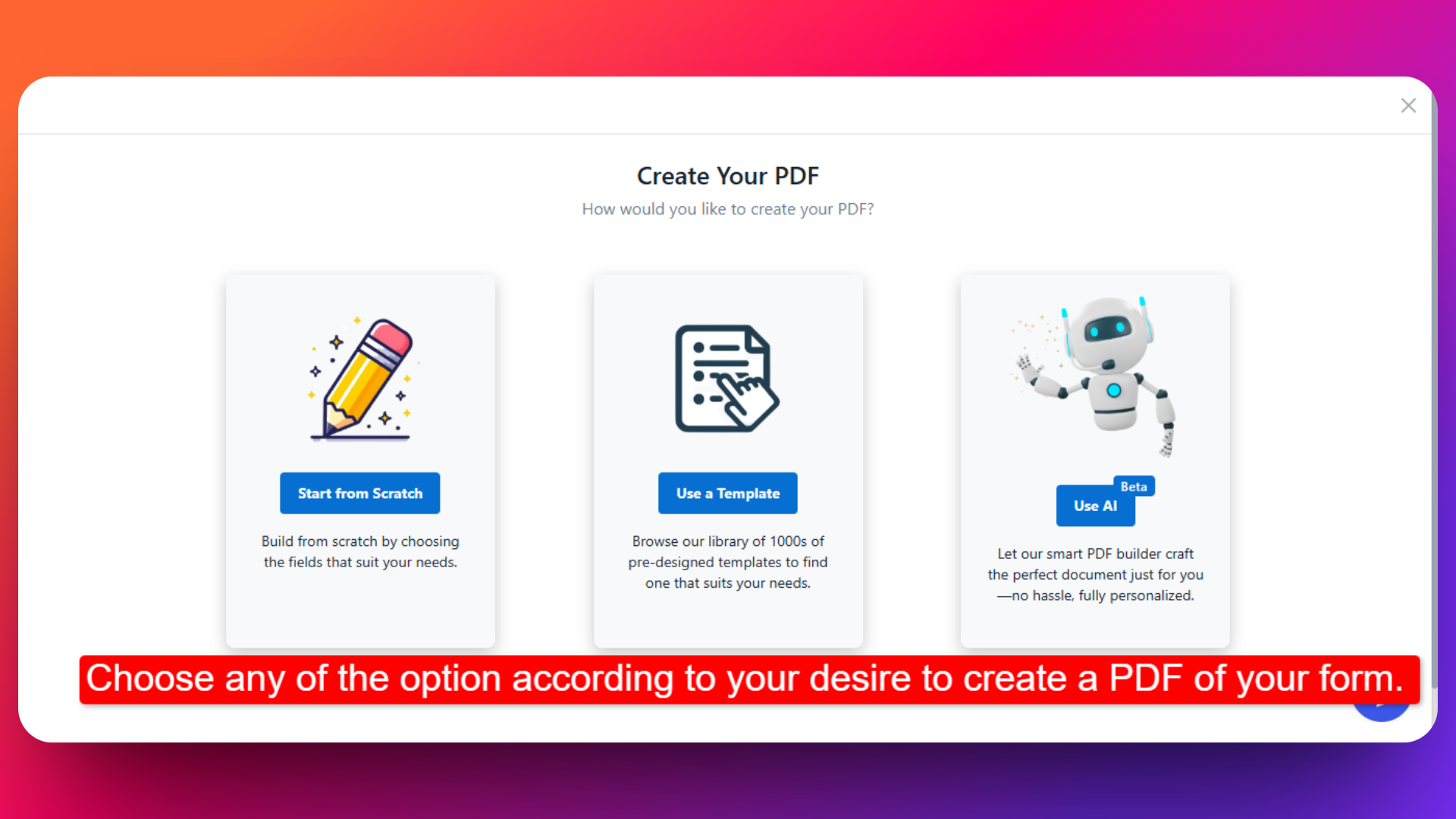
You can also refer to this Documentation for creating PDFs from Your Forms in FormNX
Step 3: Design Your PDF Layout
- Drag-drop elements: HTML Text Element, images, divider, new page, spacer.
- Upload logo/header → Set brand colors/fonts.
- Add static text: "Thank you, name!" or "Invoice #INV-submission_ref".
- Pro Tip: Use reference numbers for tracking (auto-prefix like ORD-001).
You can refer to this Documentation for detailed information on designing your PDF layout.
Step 4: Map Dynamic Fields from Form
- Select from fields from "Form Fields".
- Choose form data: {full_name}, {email}, {total_amount}, {submission_date}.
- Position fields where needed-resize/align visually.
- Preview updates to check how your PDF looks.
- Magic: Fields auto-populate on real submissions.
You can refer to this Documentation for detailed information on how to insert form data into the PDF.
Step 5: Configure Auto-Generation & Delivery
Switch to Form again and set actions:
- Enable "Attach PDF" option to attach the submitted PDF in the emails.
- Integrate Google Sheet to send data to google sheet.
- Enable "Duplicate Check" to flag repeat submissions.
Step 6: Test & Publish
- Click "Publish Form button" → Fill form → Submit.
- View generated PDF: Branded, personalized, ready-to-share.
- Embed form on site: Copy code snippet (WordPress/HTML compatible).
- Done-every future submission creates identical PDFs instantly.
To Design your PDF from Form Responses you can check out these resources for full detailed information:
| Common Use Case | Form Fields → PDF Elements |
|---|---|
| Invoice | {amount}, {items} → Table + totals |
| Certificate | {name}, {date} → Branded award |
| Quote | {services}, {price} → Professional proposal |
This process replaces Google Forms' manual CSV-to-PDF hacks, saving 80-90% time per document.
Advanced: Custom PDF Examples
With the basics covered, level up your create custom PDF from form submission game using FormNX's advanced tools for real business scenarios. These examples show how to generate PDF documents from online forms for invoices, contracts, and certificates-each pulling dynamic data into branded templates.
E-commerce Invoice PDF
- Use Case: Order forms → auto-invoice with line items, totals, and payment links.
- FormNX Steps:
- Use Product Order template.
- In PDF Builder: Drag element to add fields like items, quantity, price and payment details. Stripe should be connected in the form to receive payments.
- Add Form calculations and add formula for calculating the price like: total = qty × unit_price.
- Auto-email on submit with "INV-{ref}" reference.
Result: Professional invoice PDFs reduce payment disputes by 30%.
Legal Contract PDF
- Use Case: Service agreements → client-signed contracts with terms prefilled.
- FormNX Steps:
- Start with blank canvas or business services template here.
- Insert multi-page layout: Cover page, terms, {client_name} signature block.
- Attach to confirmation email for instant review.
Benefit: Fixed PDFs ensure compliance vs. editable Word docs.
Event Certificate PDF
- Use Case: Registration/quiz forms → personalized certificates for attendees.
- FormNX Steps:
- Pick Camp Registration template.
- AI-generate: "Create certificate with gold border, {name} center."
- Overlay photo upload field → Position {event_date}, {achievements}.
- Download the PDFs.
Impact: Boosts event NPS scores 20-25% with memorable takeaways.
Pro Tips for Custom PDFs:
- Reference Numbers: Auto-generate INV-001, CON-{date} for tracking.
- Form fill: Users start forms anywhere, PDFs generate on submit.
| PDF Type | Template Link | Dynamic Fields Used | Delivery Method |
|---|---|---|---|
| Invoice | E-commerce | {items}, {total} | Email + Download |
| Contract | Business Services | {terms}, {signature} | Email Attachment |
| Receipt | Confirmation | {name}, {date} | Email + Download |
These workflows scale for agencies managing 100s of clients-duplicate templates across forms instantly. FormNX's G2-rated editor handles complex layouts competitors can't match free.
Comparisons: FormNX vs. Others
Manual PDF hacks and competitor limitations frustrate teams needing reliable how to create PDF from form responses. FormNX eliminates these pain points with native, no-code automation-let's compare against popular alternatives.
| Tool | Custom PDF Ease | Free PDFs | Templates | Integrations | Best For |
|---|---|---|---|---|---|
| FormNX | Drag-drop editor, dynamic fields, AI generation | PDF feature available in paid plan | 100+ | Google Sheets/Stripe/Mailchimp/Webhook, etc. | Agencies, e-commerce scaling |
| Google Forms | Basic CSV export only (no design) | Need to use add-ons | None | Sheets only | Quick surveys, not professional docs |
| Jotform | PDF stamps/uploads (no true editing) | 5/month (paid plans start $34/mo) | Paid add-ons | 100+ (paid) | Simple forms, but PDF locked behind upgrades |
| Typeform | No native PDF; Zapier required | None free | Conversational only | Zapier-heavy | Engagement, not document automation |
| Formstack | Template-based (rigid) | Trial only | Limited | Enterprise APIs | Big biz compliance, high cost ($59/mo+) |
Real-world proof: Agencies on FormNX handle 1000s of submissions with branded outputs, while Google Forms users hack Sheets add-ons that break.
Templates to Try Now
Skip building from scratch-start with these battle-tested FormNX templates optimized for generate PDF documents from online forms. Each includes pre-mapped fields ready for PDF automation, so you duplicate, tweak branding, and launch in minutes.
Business Services Form PDF
- Check now
- PDF Output: Branded quote with {services}, {total}, validity date.
- Use Case: Sales teams-attach PDF to follow-up emails, close 20% more leads.
Order Confirmation Form PDF
- Check now
- PDF Output: Invoice-style receipt ({items}, {qty}, {grand_total}).
- Use Case: Ecommerce-replace manual invoicing, cut disputes 30%.
- Pro Tip: Add Stripe integration for paid orders → instant PDF documents.
Reservation Form PDF
- Check now
- PDF Output: Reservation confirmation or booking ticket including {attendee_name}, {event_name}, {event_date}.
- Use Case: Used for events, hotel bookings, appointments, and table reservations where users require a downloadable or printable confirmation PDF as proof of reservation.
Service Contract Form
- Check now
- PDF Output: Multi-page agreement with {client_details}, e-sign block.
- Use Case: Freelancers/agencies-compliance-ready docs in seconds.
You can create any type of customizable PDF for your forms according to your desired needs.
Quick Start CTA: Pick any template above → Click "Use Template" → Add your PDF design from earlier steps → Embed on site.
FAQ
Users searching how to create a PDF document from forms often have these questions. Here are answers based on FormNX's capabilities, addressing common pain points with how to create PDF from form responses.
Can I use FormNX to create PDFs?
Yes, you can generated PDFs for your forms with FormNX.
Does FormNX support custom branding in PDFs?
Fully-upload logos, set colors/fonts, add watermarks. Dynamic fields like {company_name} personalize every document. 40+ language support for global use.
What file formats can FormNX PDFs export to?
PDF only. Download and attach PDF to the emails.
Is FormNX secure for sensitive form data in PDFs?
Yes-encrypted transmission, GDPR/HIPAA-ready workflows. Fixed PDF format prevents edits (vs. editable Docs). Duplicate checks block spam submissions.
Can I generate multi-page PDFs or add calculations?
Absolutely-drag-drop multi-page layouts. Exponential calculations (e.g., {qty} × {price} = {total}) for invoices/quotes.
How fast does PDF generation happen after form submit?
Instant-processes in <2 seconds per submission. Scales to 1000s daily without slowdowns. Auto-email delivery hits inboxes immediately.
More Questions? Check FormNX FAQ and start using FormNX now
Conclusion
You've now mastered how to create a PDF document from form responses using FormNX-no code, no hassle. This guide equips you to generate PDF documents from online forms and create custom PDF from form submission, fixing the 51.7% abandonment rates and manual workflows holding teams back.
Key Wins Recap:
- 5-minute setup: Drag-drop editor + 1000+ templates automate invoices, contracts, certificates.
- 80-90% time savings: Ditch Google Forms exports for instant, branded PDFs.
- Proven ROI: +24% conversions like Paperform, -40% support queries.
Start Now-pick a template, build your first PDF, and embed it live.
Get Started Free - Unlimited PDFs, no card needed.
Watch PDF Demo - See it in action.
Transform your forms today. Questions? Contact FormNX.