💻 HTML Text Editor
The HTML Text Editor element in FormNX lets you add custom-formatted content to your form. Unlike a regular text field, this element displays pre-formatted HTML content using a rich text editor — perfect for adding instructions, descriptions, terms, or any styled content you want to show to your users.
📌 How to Add the HTML Text Editor to Your Form
Follow these simple steps:
- Open the Form Builder.
- On the left hand side, you'll see the Elements section.
- Find the HTML Text Editor element.
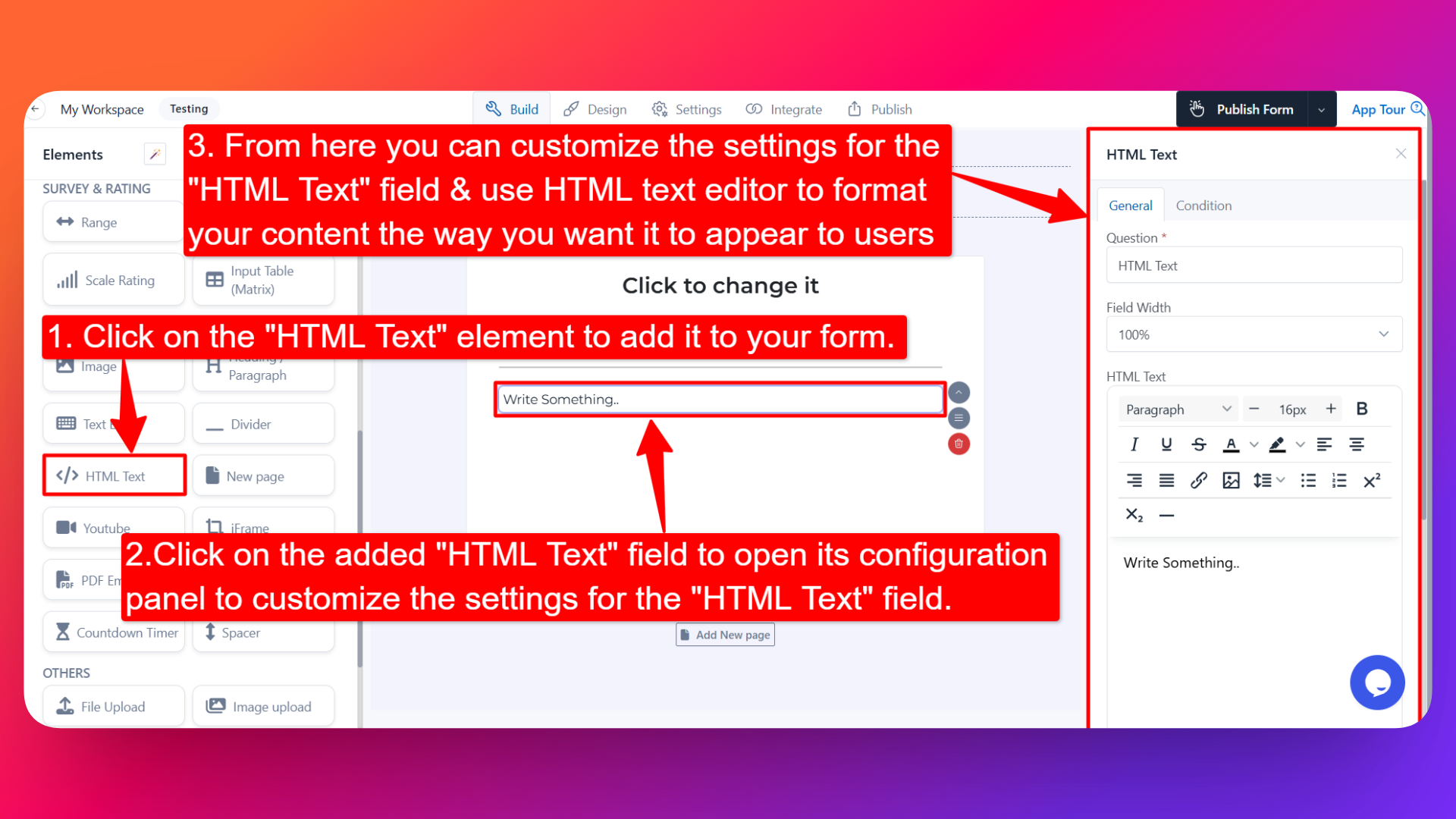
- Drag and drop the element onto your form OR click on the element to add it automatically.
Once added, the HTML Text Editor will appear in your form layout, ready to be customized.
⚙️ How to Configure the HTML Text Editor
To customize the HTML Text Editor:
- Click on the HTML Text Editor element in your form.
- The configuration panel will open on the right hand side.
From here, you can configure the following options:
- Question Label ✏️
- Add an internal label for the HTML Text Editor element.
- This is used to identify the element inside the form builder.
- Field Width 📐
- Adjust the width of the element to control how it appears on the form.
- Useful when you want the content to span only part of the form.
- HTML Text 💻
- Use the built-in HTML text editor to format your content the way you want it to appear to users.
- You can:
- Add headings, paragraphs, and lists
- Apply bold, italic, underline, and color formatting
- Insert links, images, and tables
- Adjust alignment, spacing, and styling
- The content displays exactly as you've formatted it, giving your users a polished, well-presented message.
👤 How It Works for Users
When users open the form:
- They'll see the formatted HTML content displayed on the form exactly as you designed it.
- The HTML Text Editor is display-only — users don't need to interact with it.
- It helps you communicate information clearly and attractively without writing any code.
💡 Common Use Cases
- Adding instructions or guidelines at the top of a form.
- Displaying terms and conditions in a styled, readable format.
- Showing welcome messages, introductions, or thank-you notes.
- Embedding rich-text descriptions between sections of your form.
- Adding branded content like contact details, policies, or notes to your users.
The HTML Text Editor gives you complete freedom to design and display formatted content on your form — making your forms more informative, engaging, and professional.