↕️ Spacer
The Spacer element in FormNX lets you add invisible space between fields in your form. It's a layout tool that helps you control spacing and alignment without showing anything visible to the user — perfect for fine-tuning the look of your form.
📌 How to Add the Spacer to Your Form
Follow these simple steps:
- Open the Form Builder.
- On the left hand side, you'll see the Elements section.
- Find the Spacer element.
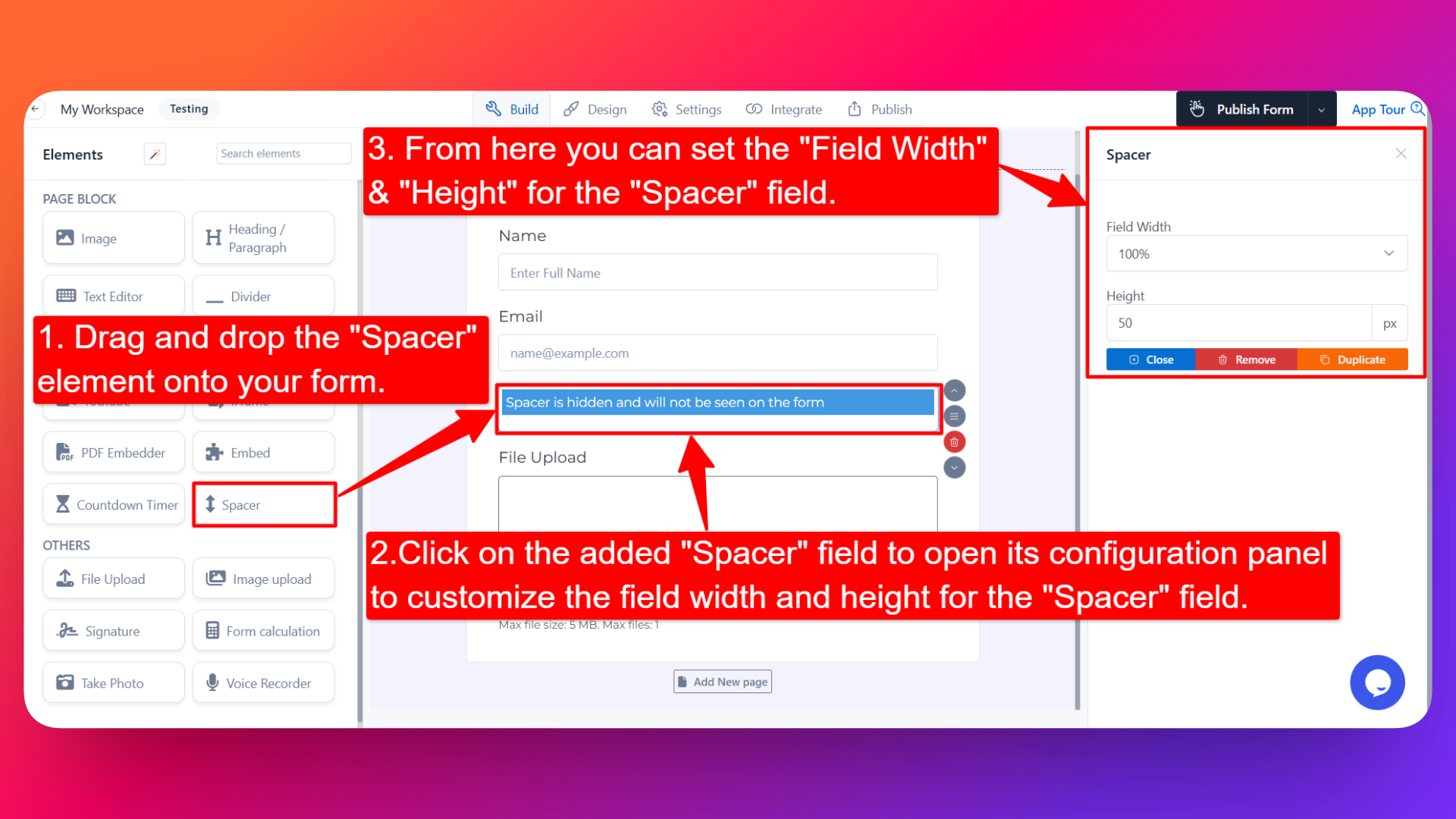
- Drag and drop the element onto your form OR click on the element to add it automatically.
Once added, the Spacer will appear in your form builder layout (only visible to you while designing — it will not be visible to users on the live form).
⚙️ How to Configure the Spacer
To customize the Spacer:
- Click on the Spacer element in your form.
- The configuration panel will open on the right hand side.
From here, you can configure the following options:
- Field Width 📐
- Adjust the width of the spacer to control how much horizontal space it takes up.
- Useful when placing the spacer alongside other fields.
- Height (in px) ⬆️⬇️
- Set the height of the spacer in pixels to control how much vertical space it adds.
- A larger value creates more empty space between elements.
⚠️ Note: The Spacer element is hidden on the live form — your users will not see it. It only adds invisible space to improve your form's layout and visual structure.
👤 How It Works for Users
When users open the form:
- They will not see the spacer itself.
- They'll only notice the extra space between the elements above and below it, giving the form a cleaner, more balanced look.
💡 Common Use Cases
- Adding breathing room between sections of your form.
- Creating visual separation between groups of fields without using a divider.
- Fine-tuning the alignment and balance of your form layout.
- Adding extra space before or after important elements like buttons, headings, or media.
The Spacer element is a simple but powerful layout tool that helps you design clean, well-spaced forms — without adding any visible content to distract your users.