📑 PDF Embedder
The PDF Embedder element in FormNX lets you embed a PDF document directly inside your form. It's a great way to share brochures, agreements, terms, guides, or any reference material with your users without making them download or open a separate file.
📌 How to Add the PDF Embedder to Your Form
Follow these simple steps:
- Open the Form Builder.
- On the left hand side, you'll see the Elements section.
- Find the PDF Embedder element.
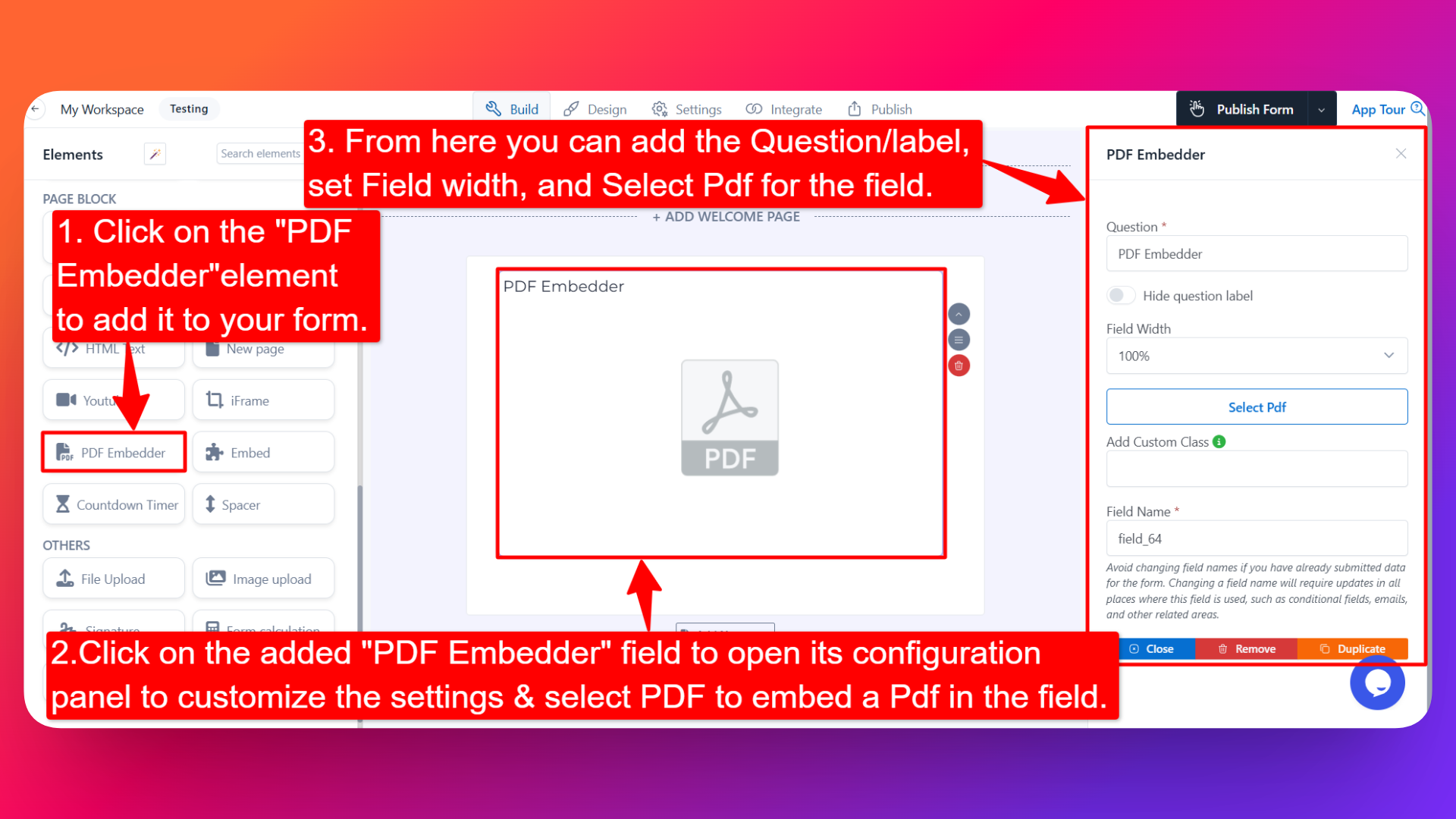
- Drag and drop the element onto your form OR click on the element to add it automatically.
Once added, the PDF Embedder will appear in your form layout, ready to be customized.
⚙️ How to Configure the PDF Embedder
To customize the PDF Embedder:
- Click on the PDF Embedder element in your form.
- The configuration panel will open on the right hand side.
From here, you can configure the following options:
- Question Label ✏️
- Add a label for the PDF Embedder element that will appear above the embedded PDF.
- Example: "Please review the agreement below before submitting."
- Hide Question Label 🙈
- Enable the Hide Question Label option to hide the label while keeping the PDF visible.
- Field Width 📐
- Adjust the width of the element to control how it appears on the form.
- Useful for placing the PDF alongside other fields or full-width on the form.
- Select PDF 📄
- Click Select PDF to choose the PDF document you want to embed in the form.
- You can pick an existing file from the file manager or upload a new one.
- The selected PDF will be displayed inline with the form so users can view it directly.
- Field Name 🏷️
- Set a custom field name used internally (helpful for identifying the element inside the form builder).
👤 How It Works for Users
When users open the form:
- They'll see the embedded PDF displayed inline with the rest of the form.
- They can scroll through the pages, zoom in/out, and view the document directly within the form.
- The PDF Embedder is display-only — users don't need to interact with it beyond viewing.
💡 Common Use Cases
- Sharing terms and conditions or agreements that users must review before submitting.
- Embedding brochures, catalogues, or product sheets in lead generation or order forms.
- Displaying event schedules, programs, or guides in registration forms.
- Showing policies, contracts, or NDAs in onboarding or application forms.
- Providing reference documents or instructions users may need while filling the form.
The PDF Embedder element makes it easy to share important documents with your users right inside your form — keeping everything they need in one place.